0 / 20000
AI Image Generator
An AI image generator turns written ideas and reference photos into complete visual compositions. Create scenes, illustrations and concepts for your brand or personal projects. Start with a description, or bring an existing photo into a new creative direction.
Give your idea a visual direction
Use the AI image generator to build a scene from scratch or give a reference photo a new style.
Text-to-image generator
Describe a character, a place or a mood. The AI image generator brings the pieces together in a complete composition.
Image-to-image AI creation
Upload a reference and describe a different setting, a new aesthetic or an illustrated interpretation.
Choose space for the scene
Set the aspect ratio for a cover, post or presentation. A wide scene and a tall portrait tell the story differently.
Find a version that fits
Compare photographic looks, illustration styles and color directions with the AI image generator.
Turn a broad idea into a clear visual brief
Starting idea
A beautiful travel picture.
Visual direction
Mountain road • aerial view • warm evening light.
Starting idea
Make this photo feel different.
Visual direction
Reference sneaker • bold illustration • focus on the laces.
Starting idea
Something that looks professional.
Visual direction
Layered paper shapes • minimal layout • soft colors.
What kind of image do you want to create?
Use the AI image generator for complete scenes, and choose a related tool when your project calls for a separate transparent element.
| Creative goal | Start with | Describe | Result | Tool or setting | Use for |
|---|---|---|---|---|---|
| Imagine a scene | Text | Subject and surroundings | Complete image | Lighting and framing | Covers and social posts |
| Rework a photo | Photo and text | The intended transformation | New composition | Visual reference | Concept variations |
| Explore an aesthetic | Text or reference | Medium and atmosphere | Stylized image | Style and palette | Digital artwork |
| Compare directions | One central idea | Different interpretations | Image variations | Number of images | Creative selection |
| Create an element | Text or reference | Object or character | Transparent PNG | AI PNG generator | Stickers and layouts |
| Isolate a subject | Existing image | Upload the photo | Subject with no background | Background remover | Collages and catalogs |
Choose a starting point for the AI image generator
The image is still in my imagination.
Describe it in text-to-image mode.
I have a photo that captures the direction.
Use it as a reference in the AI image generator.
I want to discover a visual style.
Explore photography, illustration or digital painting.
I need an object to place in a layout.
Create a transparent element with the AI PNG generator.
Direct the AI image generator with visual choices
Subject, framing, light and style give the result a personality of its own.
Subject
Make the focus clear
Tell the AI image generator who or what the picture is about and what is happening.
Try: A fox reading beneath a tree.
Avoid: Several competing subjects with no focal point.
Composition
Guide the viewer's eye
Describe positions, distance and viewpoint to organize the scene.
Try: An overhead view with the object centered.
Avoid: Conflicting camera angles in the same request.
Light and color
Set the atmosphere
Give the AI image generator a palette and a source of light.
Try: Soft window light and earthy tones.
Avoid: A long list of colors without a shared palette.
Style
Choose a visual language
Create AI images with a photographic, hand-drawn or digital-art direction.
Try: Watercolor with visible paper texture.
Avoid: Combining techniques without describing how they fit.
Model
Compare interpretations
Explore how different models respond to a brief in the AI image generator.
Try: The same prompt when comparing models.
Avoid: Changing every setting during the comparison.
Format
Plan for the destination
Choose the aspect ratio and resolution options around the finished image's role.
Try: Portrait framing for a vertical composition.
Avoid: Leaving the intended frame until after generation.
Choose the version that tells the story
Compare the AI image generator's results by the qualities your project needs.
A readable composition
Look for an arrangement that makes the subject and message clear at a glance.
Materials with character
Consider how wood, fabric, glass or paper contributes to the image's mood and sense of presence.
Space for a headline
Reserve an area for your message and add the typography in your design editor.
A recognizable visual connection
Choose the shapes, colors and details that connect the result to your reference photo.
Impact at the final size
View the options in their intended format. A thumbnail and a large cover call for different framing.
Take your favorite direction back into the AI image generator and develop the next detail.
Create AI images with a purpose
Give a concept, campaign or story a visual form you can build on.
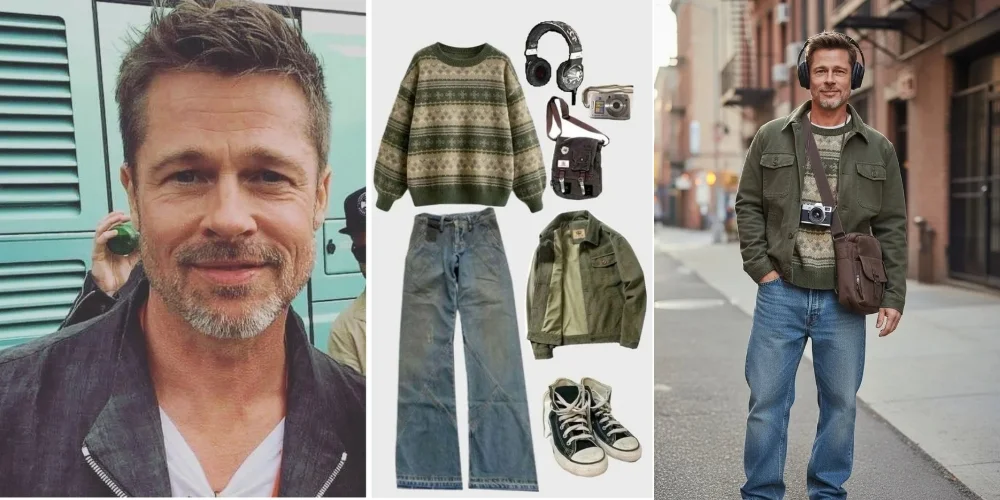
A cover that sparks curiosity
For: Blogs, newsletters and presentations.
Purpose: Express a topic through a visual metaphor.
Describe: A library floating above the clouds.
Finish with: A clear area for the headline.
A campaign with its own atmosphere
For: Ads and social media.
Purpose: Develop the mood behind your message.
Describe: The palette, audience and feeling you want.
Finish with: Details that fit the brand's visual identity.
Characters and imagined worlds
For: Stories, games and personal projects.
Purpose: Turn a narrative into visible ideas.
Describe: A character, an action and a setting.
Finish with: Reusable references to develop the series.
Spaces that inspire a direction
For: Mood boards and visual proposals.
Purpose: Explore how materials and colors work together.
Describe: The room, its lighting and its key objects.
Finish with: Variations that explore different atmospheres.
Take one idea in a new direction
Use the AI image generator to explore the choices that change how a scene feels.
Shift the time of day
Explore: Picture the same scene in morning light, at sunset or under evening lamps.
Move the viewer closer
Explore: Ask for a close-up that brings texture and expression into focus.
Create a visual family
Explore: Repeat a palette and style as you generate AI images for a connected series.
Combine two familiar ideas
Explore: Give the AI image generator an everyday subject in an unexpected setting.
How to write AI image prompts
Give the AI image generator a scene you can picture, one visual choice at a time.
A practical prompt structure
Subject + action + setting + appearance + lighting + framing.
"Paper boat • coffee cup • soft window light"
Turn a reference into a creative brief
Starting idea
"A backpack in a beautiful place."
Visual details
"Blue backpack • visible pockets • mountain trail at sunrise"
The AI image generator now has both a description of the object and a direction for its surroundings.
Develop the image in stages
- 1Generate the first version around your central idea.
- 2Choose a promising direction and refine the description.
- 3Use a result as a reference for the next exploration.
Use reference photos in the AI image generator
- Choose an image that clearly shows the object or composition you want to draw from.
- Name the features you want to bring forward in the new image.
- Describe how the setting, style or framing should change.
How to use the AI image generator
Start in the tool above and follow the results as your idea takes shape.
Choose text or a reference
Select the creation mode and upload a photo when you want a visual starting point.
Describe the direction
Write your idea, choose a model and set the AI image generator's options for the composition.
Generate and explore
Start creating, compare the versions and choose the direction you want to develop.
AI image generator FAQ
Find a practical starting point for your next visual idea.
Build the other pieces of your design
Prepare photo cutouts and transparent elements to combine with the new composition.
Your next idea starts with the AI image generator
Open up a new creative direction with the AI image generator. Start with a description or a photo and explore where the idea goes.